
What this means
- Reports are read-only views (register-style tables) that summarise activity across sites, workers, suppliers, documents, forms, and permits.
- Most reports can be exported as CSV and configured with columns and filters so customers can self-serve reporting without manual spreadsheets.
When you’ll use this
- A customer asks for a usage or compliance snapshot (who is on site, who is inducted, what’s pending approval, what documents are missing).
- You need to export a register for a weekly/monthly report, audit, or renewal/QBR pack.
- You need to investigate discrepancies (for example “the portal count doesn’t match the report”) by checking filters like inactive/expired items.
Breadcrumb Reports Overview
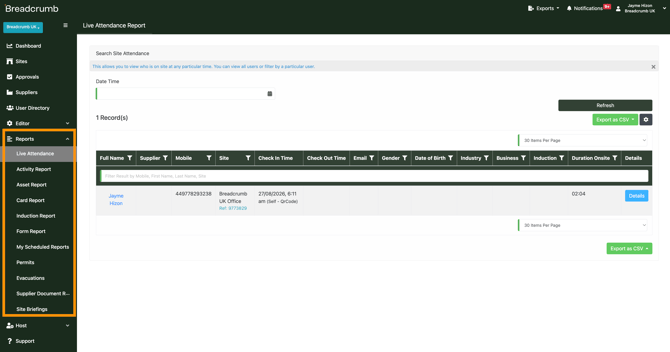
Live Attendance
- Purpose: Real-time view of who is currently on site and recent check-ins/outs
- Common actions: search by date/time, refresh, filter, export CSV, choose columns
Activity Report
- Purpose: High-level activity log across the platform (often used for operational reporting and usage-style summaries)
- Common actions: filter by questions/announcements (if relevant), refresh, export CSV, saved/scheduled reports (if enabled), get magic link (if enabled)
Asset Report
- Purpose: Track asset/plant registrations and related asset form activity
- Common actions: filter (including dynamic fields), refresh, export CSV, choose columns
Card Report
- Purpose: Reporting on cards (depending on customer configuration)
- Common actions: switch between all cards vs only latest, refresh, export CSV, choose columns
Induction Report
- Purpose: Track induction completion and compliance
- Common actions: include expired inductions yes/no, include inactive inductions yes/no, filter questions, refresh, export CSV, choose columns
Contact Tracing
- Purpose: Trace site attendance overlap for a selected user (used for incident response and audits)
- Common actions: select user, save as scheduled report (if enabled), refresh, export CSV, choose columns
Permits
- Purpose: Monitor permit workflow status and closeout (open, on hold, closed, etc.)
- Common actions: include inactive permits yes/no, refresh, export CSV, choose columns, filters
Evacuation
- Purpose: Evacuation logs and reporting by site
- Common actions: select site, view details/logs, export CSV
Supplier Documents
- Purpose: Register of supplier safety documents (for example RAMS, SDS, insurance), status, versioning, and review artifacts
- Common actions: only show latest version yes/no, filters, refresh, export CSV, view document history (files and review form), download PDF
Site Briefings
- Purpose: Reporting on site briefing forms and sign-offs (if used)
- Common actions: include inactive site briefing forms yes/no, refresh, export CSV, choose columns, filters
My Scheduled Reports
- Purpose: View and manage saved/scheduled report configurations (where enabled)
Common issues
Counts don’t match what the customer sees elsewhere
What to check
-
Confirm whether the report includes inactive or expired items, and whether the customer is comparing against an “active only” view.
What to do
-
Align filters to match the customer’s comparison view (active vs inactive, expired vs not expired), then re-export.
A document or approval disappears from Approvals after archiving
What to check
-
Archived items are removed from the active approvals list unless “include inactive items” is turned on.
What to do
-
Turn on the inactive toggle (if available) to view archived/inactive items, or unarchive if it needs to be active again.
Export fails or takes a long time
What to check
-
Very large datasets can cause exports to be slow or fail.
What to do
-
Reduce the dataset first (narrow date range, filter to a site, limit columns), then re-export.
Why this matters
- Reporting is how customers prove compliance and demonstrate control across sites without chasing paper trails.
- Clear exports and consistent filters reduce confusion, support audits, and save time when preparing weekly/monthly updates.
Need help?
If a customer’s numbers don’t align, first confirm which filters are applied (inactive, expired, latest version) and whether they’re comparing against an active-only view. If it still doesn’t line up after matching filters, capture examples (site, date range, the number shown, and the expected number) and escalate internally with screenshots and the export where possible.
If you require any assistance or have a question, please contact our Support Team on +44 7400 977 382 or email us at support@breadcrumb.co, and we'll be happy to help.